# A tibble: 8 × 4
  dept_id dept_name emp_id surv_scr
  <chr>   <chr>      <int>    <dbl>
1 A       Analytics      1       73
2 A       Analytics      2       75
3 A       Analytics      3       90
4 A       Analytics      4       79
5 B       Research       5       86
6 B       Research       6       83
7 B       Research       7       83
8 B Research 8 85Relational Datasets
Megha Joshi
A Data Frame
Data frames represent data as a table with rows and columns
Rows represent observations or record (e.g., each row contains data on employee)
Columns typically contain variables (e.g., columns contain information like score on employee satisfaction survey, what department the employee belongs to etc.)
A tibble is a modern data frame - Chapter 10 of R4DS
Limitations of Data Frames
Redundant information
- In the example data, note that department name repeats ~ same information is repeated across 4 rows
Storage and memory issues
# A tibble: 8 × 4
  dept_id dept_name emp_id surv_scr
  <chr>   <chr>      <int>    <dbl>
1 A       Analytics      1       73
2 A       Analytics      2       75
3 A       Analytics      3       90
4 A       Analytics      4       79
5 B       Research       5       86
6 B       Research       6       83
7 B       Research       7       83
8 B       Research       8       85
Relational Data
Like data frames but now we split the data into multiple tables
Cut redundant information, optimize storage and memory, organize the information better
Employee data:
# A tibble: 12 × 3
   emp_id surv_scr dept_id
    <int>    <dbl> <chr>
 1      1       73 A
 2      2       75 A
 3      3       90 A
 4      4       79 A
 5      5       86 B
 6      6       83 B
 7      7       83 B
 8      8       85 B
 9      9       81 C
10     10       83 C
11     11       90 C
12     12       84 C
Department data:
# A tibble: 4 × 2
  dept_id dept_name
  <chr>   <chr>
1 A       Analytics
2 B       Research
3 D       HR
4 E       Admin
Databases
Collection of multiple data
Database Management System
MySQL
DuckDB
Example Dataset Full
Primary Key
Every table needs to have a primary key. This would be a unique identifier for each of the rows.
Has to be unique - no duplicated key
- Possible to concatenate two or more variables to create a primary key
Should not have missing data for primary key - we need an identifier
Example:
Employee ID in the employee dataset (
`employee_dat`)Department number in the department dataset (
`department_dat`)
Foreign Keys
Counterpart to the primary key
An identifier in a another table that matches with the primary key in a table
Example:
- Department number is a foreign key in
employee_datthat matches with the primary key department number in thedepartment_dat
- Department number is a foreign key in
Mutating Joins
Full Outer Join
Join all the rows of both tables as long as there is a matching record in either table.
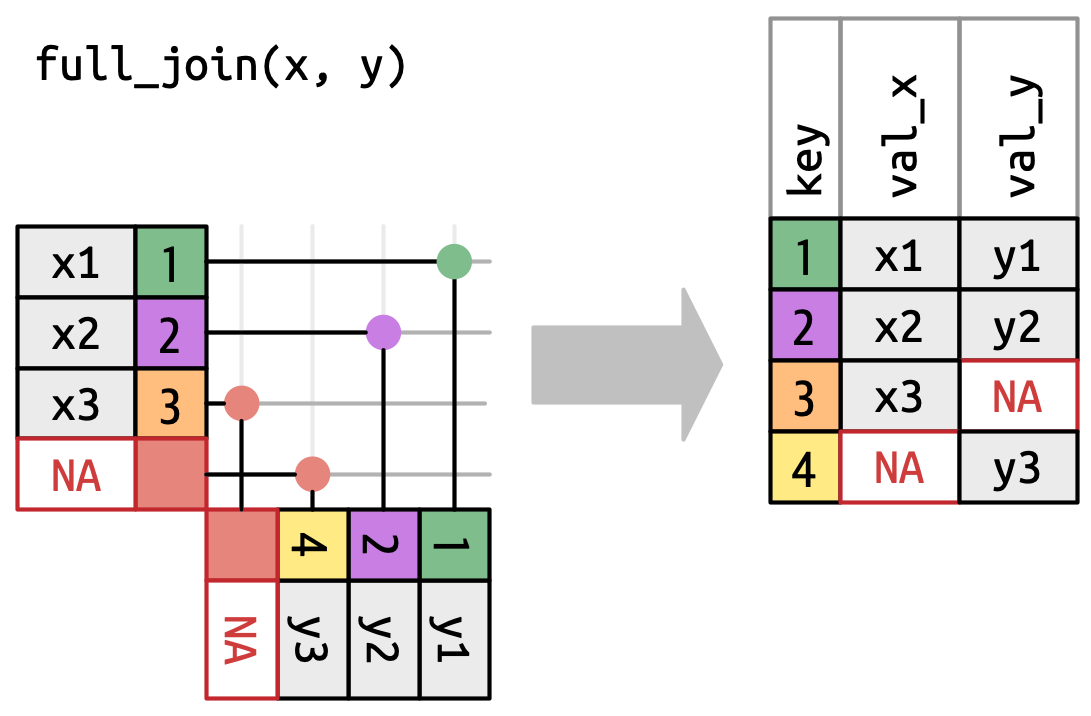
full_join()
# A tibble: 14 × 4
   emp_id surv_scr dept_id dept_name
    <int>    <dbl> <chr>   <chr>
 1      1       73 A       Analytics
 2      2       75 A       Analytics
 3      3       90 A       Analytics
 4      4       79 A       Analytics
 5      5       86 B       Research
 6      6       83 B       Research
 7      7       83 B       Research
 8      8       85 B       Research
 9      9       81 C       <NA>
10     10       83 C       <NA>
11     11       90 C       <NA>
12     12       84 C       <NA>
13     NA       NA D       HR
14     NA       NA E       Admin
Left Outer Join or Left Join
Join all the rows of the left table and the matching rows in the right table.
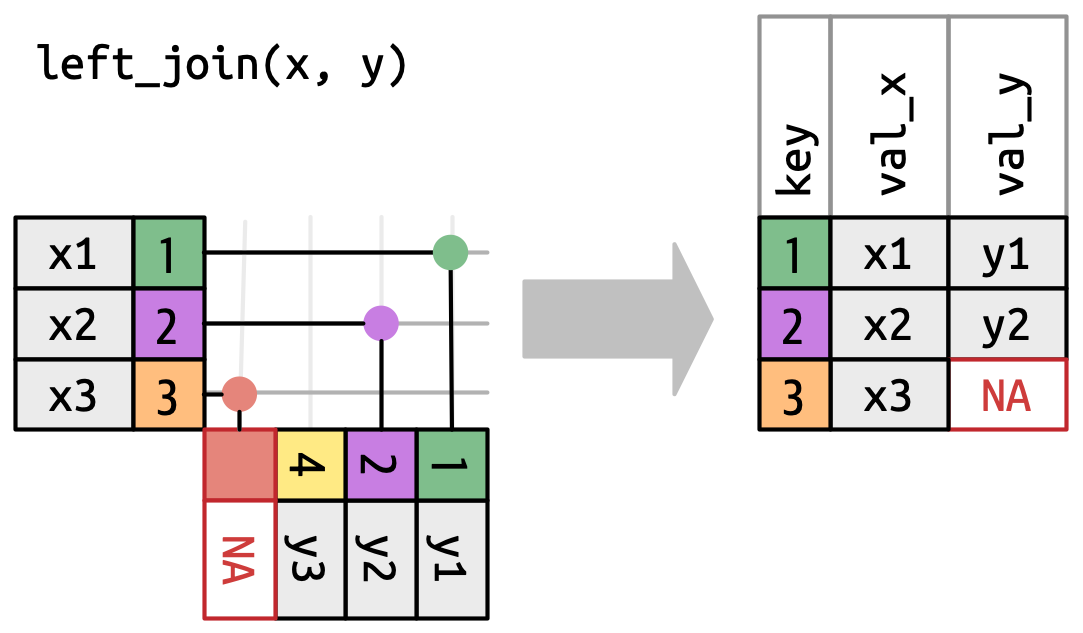
left_join()
# A tibble: 12 × 4
   emp_id surv_scr dept_id dept_name
    <int>    <dbl> <chr>   <chr>
 1      1       73 A       Analytics
 2      2       75 A       Analytics
 3      3       90 A       Analytics
 4      4       79 A       Analytics
 5      5       86 B       Research
 6      6       83 B       Research
 7      7       83 B       Research
 8      8       85 B       Research
 9      9       81 C       <NA>
10     10       83 C       <NA>
11     11       90 C       <NA>
12     12       84 C       <NA>
Right Outer Join
Join all the rows of the right table and the matching rows in the left table.
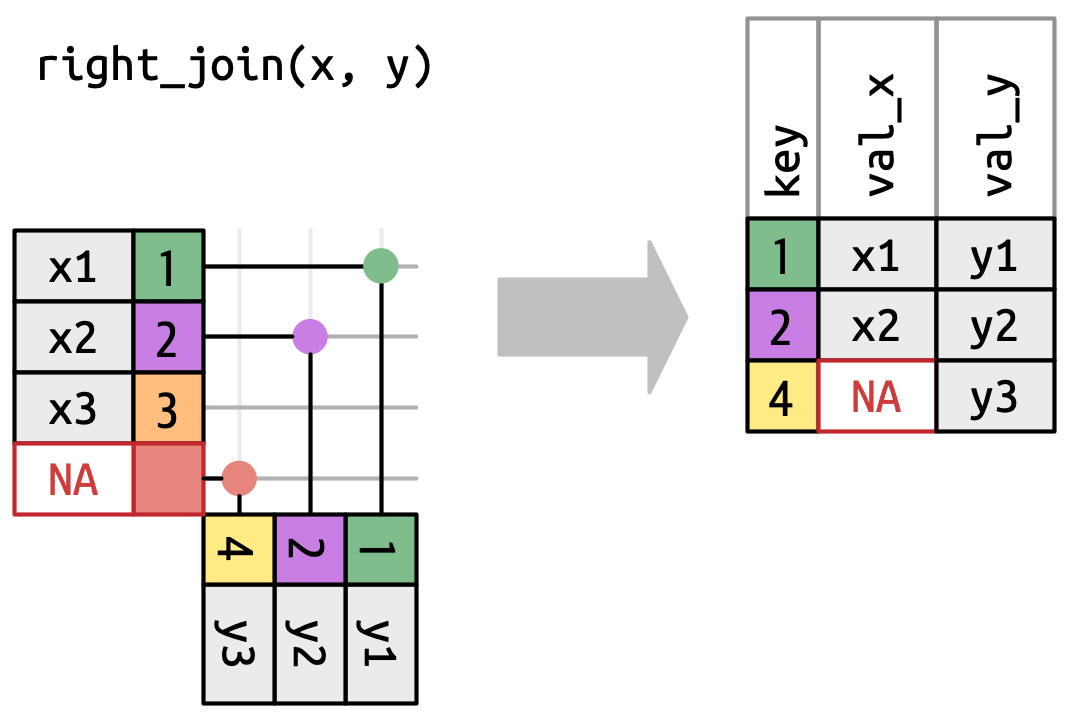
right_join()
# A tibble: 10 × 4
   emp_id surv_scr dept_id dept_name
    <int>    <dbl> <chr>   <chr>
 1      1       73 A       Analytics
 2      2       75 A       Analytics
 3      3       90 A       Analytics
 4      4       79 A       Analytics
 5      5       86 B       Research
 6      6       83 B       Research
 7      7       83 B       Research
 8      8       85 B       Research
 9     NA       NA D       HR
10     NA       NA E       Admin
Inner Join
Join the rows which are present in both tables.
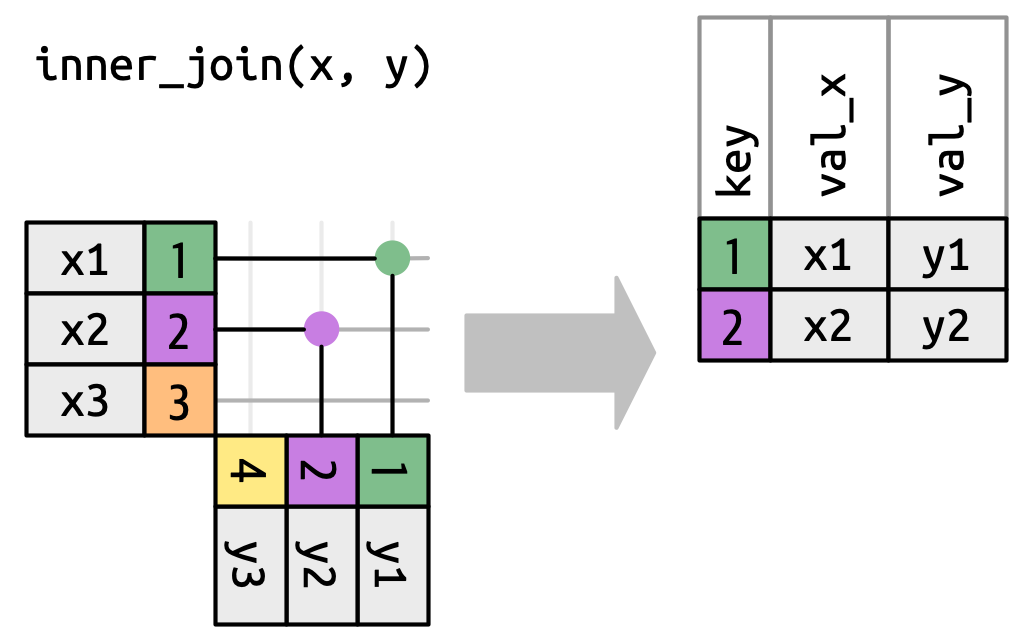
inner_join()
Cross Join or Cartesian Join
Returns all possible combinations of all rows.

cross_join()
# A tibble: 48 × 5
   emp_id surv_scr dept_id.x dept_id.y dept_name
    <int>    <dbl> <chr>     <chr>     <chr>
 1      1       73 A         A         Analytics
 2      1       73 A         B         Research
 3      1       73 A         D         HR
 4      1       73 A         E         Admin
 5      2       75 A         A         Analytics
 6      2       75 A         B         Research
 7      2       75 A         D         HR
 8      2       75 A         E         Admin
 9      3       90 A         A         Analytics
10      3       90 A         B         Research
# ℹ 38 more rows
Filtering Joins
Semi Join
Filter records from left table that has matching records in right table.

semi_join()
Anti Join
Filter records from left table that do not have matching records in right table.

anti_join()
Thank you!
Theme by Beatriz Mills on GitHub